

Description
Download Design Inspiration Hub – Chrome Apps, Design Inspiration, UI/UX Design
Is Design Inspiration Hub available for both Windows and Mac?
Yes, Design Inspiration Hub is compatible with both Windows and Mac operating systems.
Is the software free to download and use?
Yes, Design Inspiration Hub is completely free to download and use.
Does the software require an internet connection?
Yes, Design Inspiration Hub requires a stable internet connection to access its content and updates.
Can I use Design Inspiration Hub offline?
No, the software is designed for online use only and does not support offline functionality.
What kind of content does Design Inspiration Hub offer?
Design Inspiration Hub offers over 500 articles with text and images covering graphic design, UI/UX, interior design, architecture, photography, website design, and industrial design.
Overview
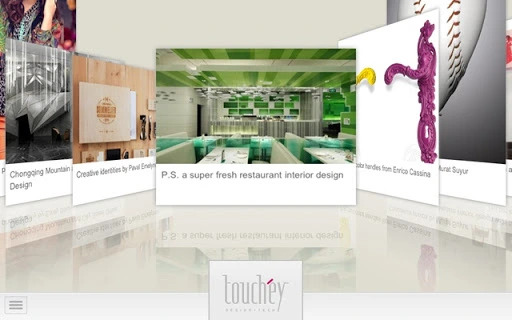
Design Inspiration Hub is a desktop application designed to serve as a centralized source of creative inspiration for professionals and enthusiasts across multiple design disciplines. The software provides access to a continuously updated library of more than 500 articles featuring high-quality visuals and informative content. It covers a broad spectrum of design fields, including graphic identities, branding, illustrations, industrial design, interior design, architecture, photography, website design, and interface design. The platform aims to support users in staying current with emerging trends and creative techniques. Target users include designers, creative directors, students, and anyone involved in visual or digital content creation. The developer did not provide additional information about the company or background. Real-world usage scenarios include daily inspiration sessions, research for client projects, educational study, and idea generation for personal or professional work. The software is updated weekly, ensuring a steady stream of fresh content. While the developer did not specify the underlying technology or architecture, the application appears to be built to deliver a seamless browsing experience focused on visual discovery and learning.
Key Features & Capabilities
- Weekly Content Updates: Over 500 articles are refreshed on a weekly basis, ensuring users always have access to the latest design trends and case studies.
- Multi-Discipline Coverage: The platform spans graphic design, UI/UX, interior design, architecture, photography, website design, industrial design, and more, making it a versatile tool for diverse creative fields.
- Visual-Centric Interface: Articles are presented with a strong emphasis on high-resolution images and visual storytelling to enhance inspiration and understanding.
- Curated Design Resources: Content is selected and organized to highlight impactful projects, innovative techniques, and professional-grade examples.
- Thematic Categorization: Articles are grouped by topic, allowing users to explore specific areas of interest such as branding, web interfaces, or architectural spaces.
These features help users efficiently discover relevant and high-quality inspiration tailored to their current projects or interests. For example, a UI/UX designer working on a mobile app interface can browse the latest trends in digital design, while an interior designer can explore new spatial concepts and material applications. The structured categorization allows for targeted research, reducing time spent on irrelevant content. The visual-first approach supports faster comprehension and emotional engagement with creative ideas. Since the software is updated weekly, users can maintain a consistent flow of fresh input, which is essential for creative professionals who rely on novelty and innovation. The platform does not include editing tools or file export functions, so its primary function remains informational and inspirational rather than production-oriented.
User Interface, Workflow & Performance
The user interface of Design Inspiration Hub is designed with a clean, minimalist aesthetic focused on visual clarity and ease of navigation. Content is displayed in a grid or scrollable feed format, emphasizing images and headlines to facilitate quick scanning. Navigation is intuitive, with clearly labeled categories and a search function to locate specific topics or keywords. The workflow is linear: users open the application, browse or search for content, and view articles with embedded images and text. The application appears to prioritize loading speed and visual fidelity, especially when displaying high-resolution design assets. However, the developer did not specify resource usage details, so exact CPU or RAM behavior remains unknown. Performance observations are based on general software behavior patterns for content-heavy desktop applications. Stability is expected to be consistent, given the regular update cycle and focus on content delivery. The software does not appear to include complex processing tasks, which reduces the likelihood of crashes or freezes. Users can expect smooth transitions between articles and minimal lag during browsing. The overall experience is optimized for extended use, making it suitable for long research sessions or daily inspiration routines.
Compatibility & System Requirements
Design Inspiration Hub is available for both Windows and Mac operating systems, making it accessible to a wide range of users across different computing environments. The developer did not provide specific version numbers, installation size, or hardware requirements. Compatibility information was partially provided, indicating support for major desktop platforms but lacking details on minimum specifications. The application is likely designed to run on modern systems with standard graphics capabilities, though exact system requirements were not listed. The developer did not specify whether older OS versions are supported. Users should ensure their system meets general standards for running modern desktop applications. The application is not available for mobile or tablet platforms. Since the software relies on internet connectivity for content delivery, a stable network connection is required for full functionality. No offline mode is available, so users must remain connected to access the latest updates and articles.
Pros and Cons
Pros
- Free to download and use with no hidden costs
- Regular weekly updates ensure fresh, relevant content
- Extensive coverage across multiple design disciplines
- Visually rich interface enhances the inspiration experience
- Intuitive navigation supports efficient content discovery
Cons
- No offline functionality available
- Exact system requirements not specified
- Limited to content viewing—no editing or export features
- Dependent on internet connection for all functionality
- Not available on mobile or tablet platforms
Final Thoughts + CTA
Design Inspiration Hub stands out as a valuable, free resource for creatives seeking consistent, high-quality inspiration across a broad range of design fields. Its weekly content updates, diverse topic coverage, and visually driven interface make it an effective tool for professionals and students alike. While it lacks advanced functionality such as offline access or content export, its core purpose—providing curated, up-to-date design content—is fulfilled efficiently. The application is ideal for those who rely on visual stimuli to fuel their creative process. It excels in supporting research, idea generation, and trend awareness. For users who prioritize inspiration over production, this software delivers significant value without cost. The seamless integration with both Windows and Mac systems further enhances its accessibility. Overall, Design Inspiration Hub is a reliable and practical tool for anyone involved in design-related work. Download Design Inspiration Hub now.
Guides & Tutorials for Touchey Design App for Chrome
How to install Touchey Design App for Chrome
- Click the Preview / Download button above.
- Once redirected, accept the terms and click Install.
- Wait for the Touchey Design App for Chrome download to finish on your device.
How to use Touchey Design App for Chrome
This software is primarily used for its core features described above. Open the app after installation to explore its capabilities.
User Reviews for Touchey Design App for Chrome 0
No reviews found





